

HR automation software no longer just stores records. In 2026 it writes job descriptions, screens resumes, and answers employee questions on its own. This guide cuts through the hype and tells you what actually changed, how much time it saves, and what to ask any vendor before you upgrade.
What HR Automation Actually Does: What’s Real and What’s Hype
HR automation handles repetitive tasks (approvals, data entry, and screening) automatically. Real AI goes further: it reads unstructured input and returns a useful output (a ranked shortlist, a draft JD, a direct answer). Everything else is ordinary automation with a new label. For a bigger picture, HROpal’s take on AI’s evolving role in HR is worth a read.
📌 External data: SHRM found that 43% of organisations now use AI for HR tasks, nearly double the 26% recorded a year earlier, with recruiting as the leading use case (66% use it to draft job descriptions, 44% to screen resumes). Source: SHRM, AI in HR 2025
HR Chatbots: Answering Employee Questions Without the Bottleneck
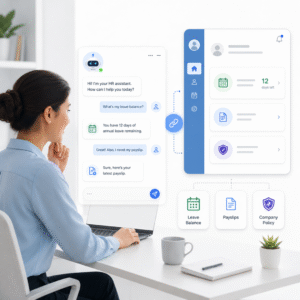
An hr chatbot lets employees get instant answers on leave balances, payslips, and policy by simply asking, instead of emailing HR and waiting. When it’s wired into a proper employee self-service portal, it handles the routine 70% of queries and frees your team for the work that actually needs human judgement.
JD Automation: Writing Job Descriptions in Minutes, Not Hours
JD automation generates a complete, role-specific job description from a few inputs in seconds, cutting a 45-to-60 minute task down to 2-to-5 minutes per JD. AI-drafted JDs are also more consistent across departments, and they’re where ai recruitment starts paying off before a single resume arrives.
Smart CV Parsing and Candidate Matching: From 200 Resumes to a Shortlist
CV parsing reads any resume into a structured profile; matching then scores each profile against the job and produces a ranked shortlist. Modern resume parsing software reads context (it knows ‘CRM’ and ‘Salesforce’ mean the same thing), so strong candidates don’t get dropped for using the wrong word. The result: 8-10 hours of manual screening per role becomes minutes, with a visible job-fit % for each applicant. That’s practical ai recruitment in 2026.
Before and After: How Much Time AI Actually Saves Your HR Team
The numbers below are representative for a mid-sized HR team. Individual savings vary with hire volumes and query frequency, but the pattern is consistent across platforms that have implemented native AI:
| HR task | Legacy HRMS / manual | AI-powered HR automation |
|---|---|---|
| Write one job description | 45–60 minutes | 2–5 minutes (AI draft, then edit) |
| Screen ~200 resumes for one role | 8–10 hours | Minutes (auto-parse + ranked shortlist) |
| Answer a routine employee query | An HR interruption, each time | Instant self-service / chatbot, 24/7 |
| First-pass candidate scoring | Subjective, recruiter-by-recruiter | Consistent job-fit % on every applicant |
| Onboarding paperwork & approvals | Manual chase-ups | Triggered workflows, status visible to all |
📌 External data: HR leaders are driving adoption. By 2025, roughly three-quarters of those at HR director level and above had adopted AI, and 87% of CHROs forecast greater AI use within HR processes. Source: SHRM, State of AI in HR 2026
Is Your Company Ready to Adopt AI in HR? A Practical Checklist
Readiness is about data and process maturity, not size. Run through this before talking to vendors:
- Volume test Do you hire often enough, or field enough employee queries, that minutes saved per task add up to real hours per week?
- Data test Is your employee data centralised and reasonably clean, or scattered across spreadsheets and disconnected tools? AI is only as good as the data it reads.
- Process test Are your core workflows (leave, approvals, onboarding) defined, even if manual? Automating a broken process just makes the mess faster.
- Governance test Do you have someone who will own AI oversight, so outputs get a human review before they’re acted on?
- System test Does your current HRMS even offer usable AI? In SHRM’s survey, 57% of HR teams said their core system has no AI functionality at all, and another 29% said it has AI they don’t use.
If most of these point the same way, the question isn’t whether to adopt hr automation tools. The real question is whether your current platform can actually deliver them, or whether a purpose-built upgrade is the faster path.
Questions to Ask Any HRMS Vendor About Their AI Capabilities
Bring these questions to every vendor demo. A platform with genuinely built-in AI will answer all six clearly and without hedging:
- Is the AI native to your core system, or a third-party bolt-on? Bolt-ons create the “we have AI but don’t use it” trap. AI built into the platform, as in HROpal’s smart candidate matching system, and works inside the same data your team already uses.
- Can you parse resumes in multiple formats and languages automatically? Ask to see it read a messy, real-world CV live.
- Do you score candidates with a visible job-fit percentage, and is the scoring explainable? “It just ranks them” isn’t enough. You need to see why.
- Can employees self-serve common requests without emailing HR? This is the chatbot / self-service question, and it directly measures how much load comes off your team.
- Does every AI output stay under human review? Around 80% of workers expect a person to check AI output before it’s used; your governance should match that.
- How does the platform handle local compliance, including UAE Wage Protection System (WPS) and regional labour law, while automating payroll and records? Compliance is where generic global tools quietly fall short.
Frequently Asked Questions About HR Automation Software
Q1. What is HR automation software?
HR automation software completes repetitive HR tasks (payroll, leave, screening, and employee queries) automatically, with little manual effort. In 2026, the leading platforms add AI on top, so the software can read resumes, draft job descriptions, and answer questions, not just store data.
Q2. What is an HR chatbot and is it worth it?
An HR chatbot lets employees get instant answers about leave, payslips, and policies without contacting HR directly. It’s worth it when routine questions eat much of your team’s day, and it works best connected to a full self-service portal rather than as a standalone widget.
Q3. How does AI recruitment actually screen resumes?
AI recruitment parses each resume into a structured profile, then scores it against the job using NLP and machine learning to produce a ranked shortlist with a job-fit percentage. Unlike old keyword filters it reads context, and a human recruiter still makes the final call.
Q4. Will AI replace HR jobs?
No. Current evidence points to job transformation, not replacement, with AI handling repetitive tasks while people keep the judgement work. Grievances, retention, and workforce planning stay human, and most HR professionals treat AI as a complement rather than a substitute.
Q5. How do I choose between HR automation tools and platforms?
Choose based on whether the AI is native to the core system, explainable, and compliant with your local labour laws, not on which demo looks slickest. The right hr automation tools sit in one connected platform rather than a stack of bolt-ons.
Q6. Does my legacy HRMS already have AI, or do I need to upgrade?
Most likely not in a usable form: SHRM found 57% of HR teams said their core system has no AI functionality, and another 29% had AI they weren’t using. Ask your current vendor for live resume parsing and explainable scoring; if it’s vague or unused, upgrading is usually faster than retrofitting.